Indie studio · Games · Apps · Interactive experiences

Play your Imagination.™

Way of the Pigeon is creating the “next-awesome” in games, apps and interactive experiences — and bringing ownership and options back to the people who use them.

  • Free where possible
  • Pay per version
  • Offline-first
  • AI & cloud optional

The Way

Own it. Choose it. Keep it.

Owning things is starting to feel old-fashioned. We think it shouldn't be. So wherever we can, the things we make come with real choices — and nothing important locked behind a login.

01

Free where possible

A genuinely useful free tier — not a timed demo dressed up as one.

02

Pay per version

Buy a version and it's yours. Upgrade when the next one is worth it to you.

03

Offline-first

Your stuff lives on your device and keeps working when the internet doesn't.

04

AI, subscriptions & cloud — optional

Extras you can switch on when they help, and leave off when they don't.

What we make

Games. Apps. Interactive experiences.

A small studio with a big sketchbook. Some projects are out in the open, more are still on the workbench — the newsletter hears about them first.

Games

Playful, replayable and made to be finished — with the kind of options players used to take for granted.

Apps

Desktop-first tools that respect your time, your data and your wallet — Collektory first, Feedback Pigeon on the web, and more in the lab.

Interactive experiences

Things that blur the line between watching and playing — on stream, on screen and in the room.

Flagship app Windows beta coming soon

Collektory: every game you own. One shelf.

One library for every game you own across 20+ stores and launchers — Steam, Xbox, PlayStation, Nintendo, Epic, GOG and more — together with your physical shelves, books, comics, apps and hardware. It lives on your PC, works offline and never needs an account — cloud sync between your devices is there if you want it.
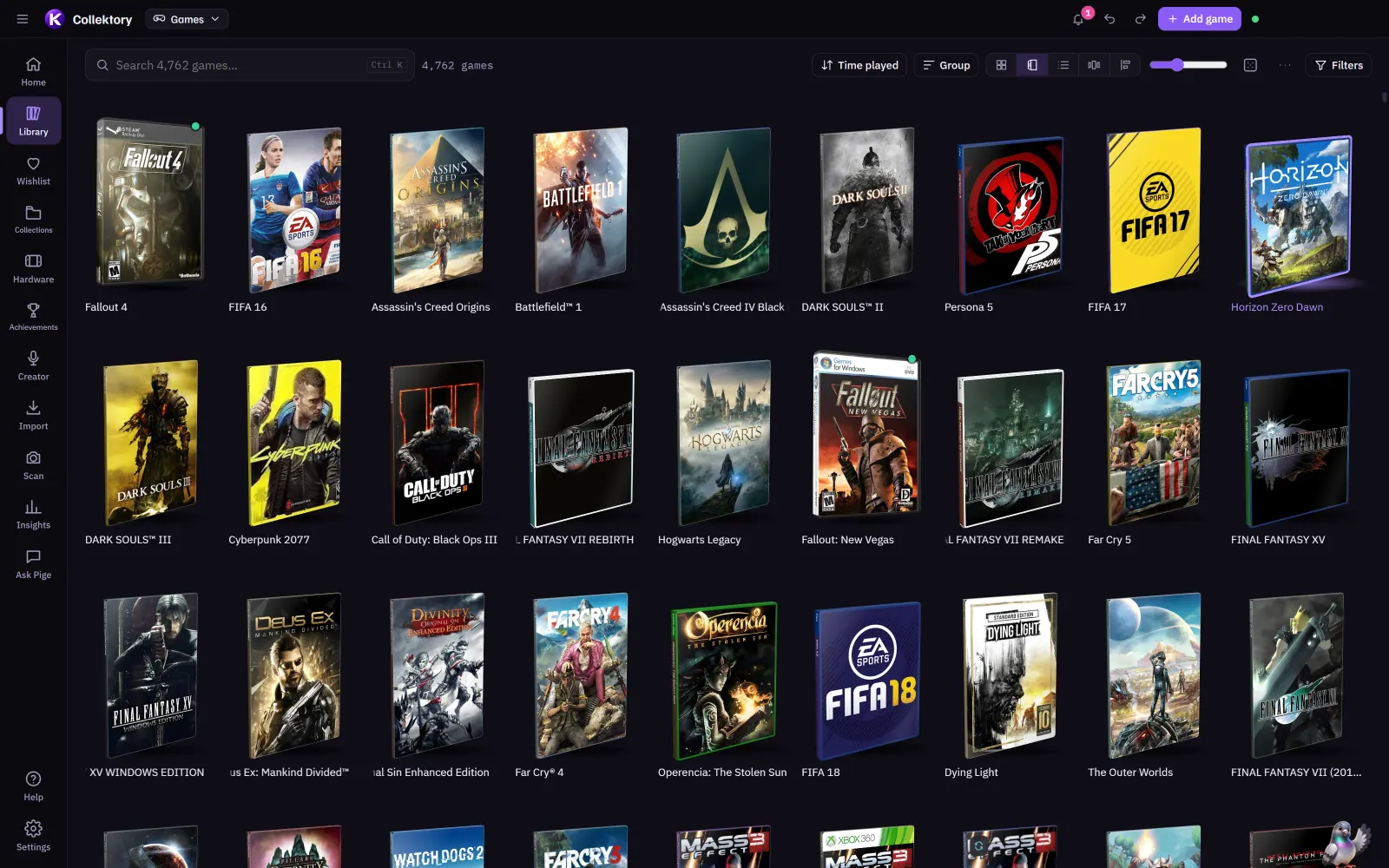
Collektory's Boxes view: a library of games standing up as 3D boxes, each in the right case for its platform.
Your games, standing up in their real boxes — PS2 keep cases, SNES cardboard, PC big boxes.
  • 20+ stores & launchers imported, the same game from three stores merged into one.
  • Offline-first, no account needed. Your library is a file on your PC — take it with you as JSON or CSV. Sign in only if you want cloud sync.
  • AI optional. Smart search and Pige, the resident pigeon, can run entirely on your PC.
  • Real flair. 3D boxes, cover flow, a timeline and covers that fly into view.
  • Built for creators. Now playing, counters, a content calendar, giveaway keys, Twitch panel pictures and OBS overlays.
  • Free, with optional plans. The whole app is free. Two optional plans, Boxed (cloud sync) and Mint (sync plus cloud AI), monthly or yearly, are coming soon.
A short clip of Collektory: picking a game in the library and its cover flying into the details panel.
Open a game and its cover flies into the details panel. Animations full, reduced or off — Collektory respects your Windows setting.

New in Collektory lately

  • Releases & CalendarWhat's out soon, out lately or still TBA, and a Calendar with your own plans and release days from your wishlist and library. Add any game to it with the details filled in.
  • A wishlist that watches pricesPrices in your currency with a "buy at" target and a bell when one drops, Check stores with your own list of shops, wishlist collections, and imports from Steam, GOG, Epic or a pasted list.
  • Trade & giveaway keysWhat you might sell, swap or give away, priced from eBay, CeX or your own figure. Paste your key table straight from Word, Excel or a web page and set channel-points prices. The keys stay on your PC and are never synced.
  • Play historyLog what you played, beat, read or watched, whether on stream, in co-op, borrowed or on Game Pass, with totals, filters and a Collekted-per-year panel in Insights.
  • Share it, if you likePublic profiles and friends, shareable lists and history pages, website embeds, OBS overlays, Twitch panel pictures and profile banners. Everything starts private.
  • Discord statusYour Discord shows what you're up to in Collektory, whether you're playing, reading, building a tier list or browsing Releases, each with its own picture.

Meet Pige Pop.

Collektory's pigeon has a fresh, friendlier look, and now he moves. He waves hello, thinks while the AI works, cheers your imports and picks, looks surprised when nothing matches and naps late at night. If you've turned animations down, he holds still.

Pige Pop, Collektory's pigeon mascot: a round, pale-blue cartoon pigeon waving one wing.
Pige Pop, as he appears in the app.

Also from the studio Opening soon

Feedback Pigeon: hear your users. Show them what's next.

Feedback boards, voting, a public roadmap and What's new release notes, plus a widget that sits inside your app. We built it for our own apps (it's where Collektory's bug reports, ideas and release notes live), and now anyone can use it.
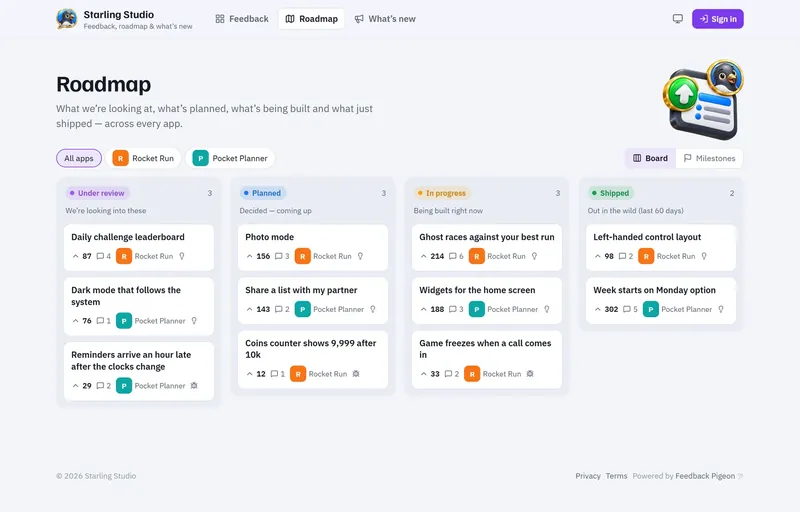
A Feedback Pigeon roadmap for a demo studio: requests for two made-up apps in Under review, Planned, In progress and Shipped columns, each with its vote count.

Everything between "I wish…" and "It's here!"

Bug reports arrive with the app version and device details already attached. A duplicate finder suggests similar posts while people type, and votes say how much it matters. When something ships, the release notes mark it done and everyone following it hears.

Opening soon: free for one product, with unlimited boards, team seats and voters, and paid plans with your own domain and branding. See it working on Collektory's board in the meantime.

Screenshot: a demo workspace with made-up apps and numbers.

The newsletter

Join the Way of the Pigeon newsletter — free.

Game dev updates, design tutorials and first looks at what's coming out of the dojo — including the Collektory beta. No spam; unsubscribe any time.

In the lab Not available yet

Cashflow Pigeon: see what happens before it happens.

What we've been building behind the scenes. Cashflow Pigeon is a desktop cashflow planner: a 12-month, day-by-day forecast of every account, so you can spot the tight week before you're in it. Your money stays in one file on your own PC — nothing is stored online.
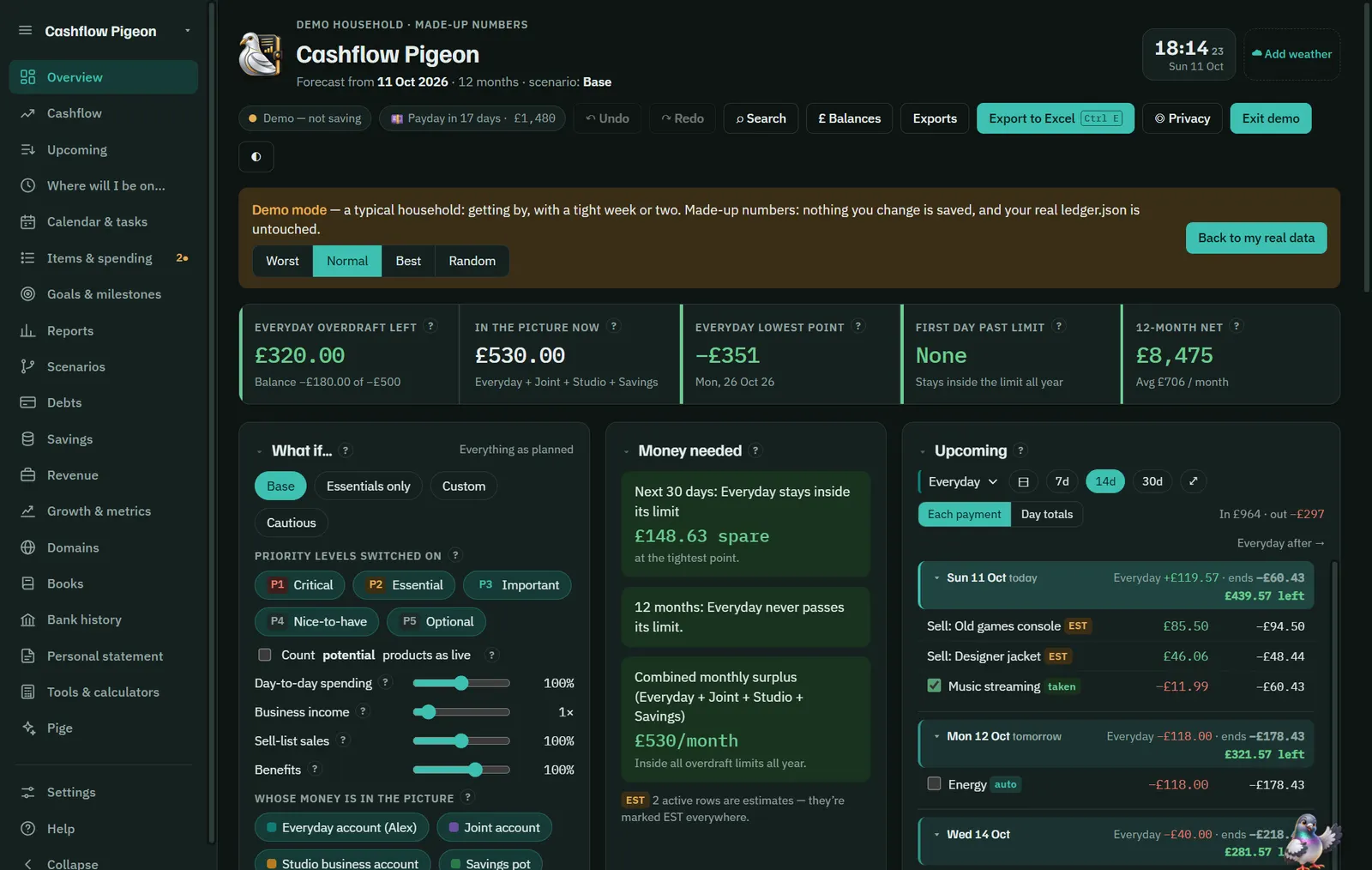
Cashflow Pigeon's Overview in demo mode: headline numbers for overdraft left, money in the picture, the lowest point and the 12-month net, with What if sliders, Money needed and an Upcoming list of payments by day.
The real app running its built-in demo household — made-up numbers, nothing saved.
  • The forecastEvery account, day by day for a year — bills, debts, savings pots, goals, side income and what you sell, with the lowest point flagged before it arrives.
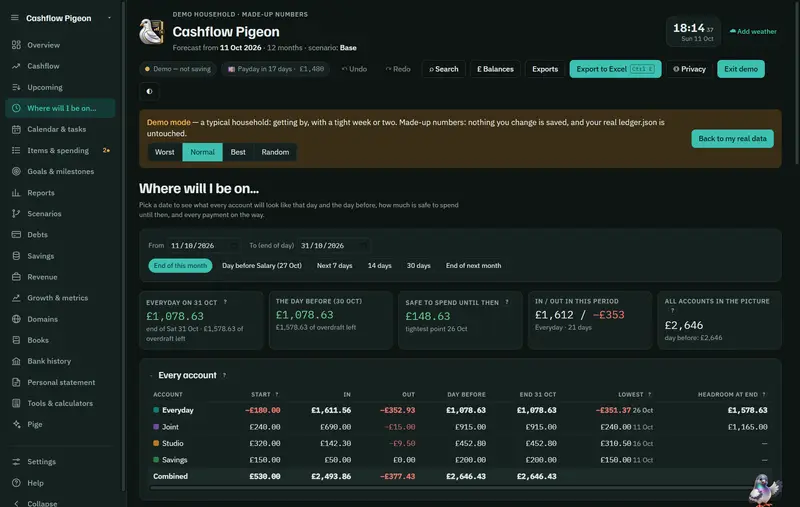
  • What if… & Where will I be on…Try an essentials-only month or cancelling a subscription; pick any date to see every balance and what's safe to spend until then.
  • Calendar & UpcomingEvery payment on the day it lands. Tick them off as paid and see paid against planned.
  • Statements & BooksImport bank statements (CSV, OFX, QIF or PDF), match them to the plan and keep the books for personal, sole-trader and limited-company money — through to year-end figures and Corporation Tax workings.
  • PigeAsk "can I afford…?" and get an answer from your own numbers. Optional AI runs on your PC.
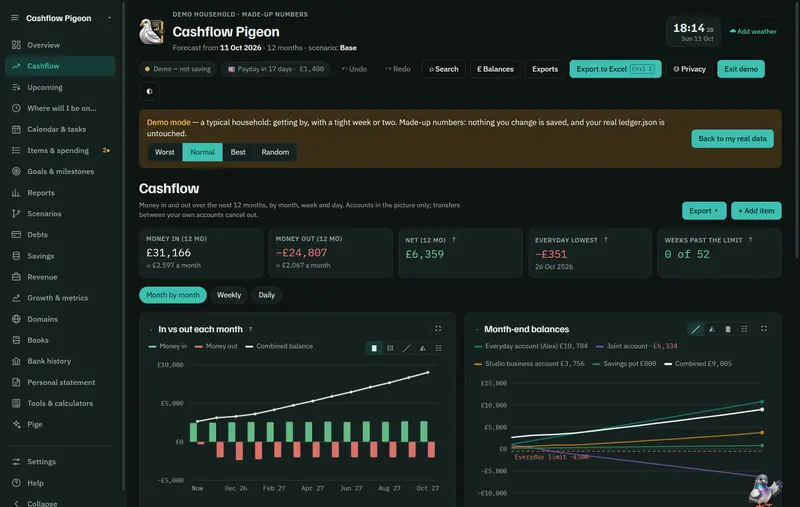
Cashflow Pigeon's Cashflow page: money in and out over the next 12 months, a monthly bar chart and month-end balances for each account.
Money in and out for the next 12 months, by month, week or day.
Cashflow Pigeon's Where will I be on… page: pick a date range and see each account's start, money in and out, lowest point and end balance.
Pick a date and see every account on that day — and what's safe to spend until then.

A planning tool, not financial advice. Want to hear when it's ready? The newsletter hears first.

In the lab Not available yet

Creator Pigeon: package ideas into clicks — on every platform.

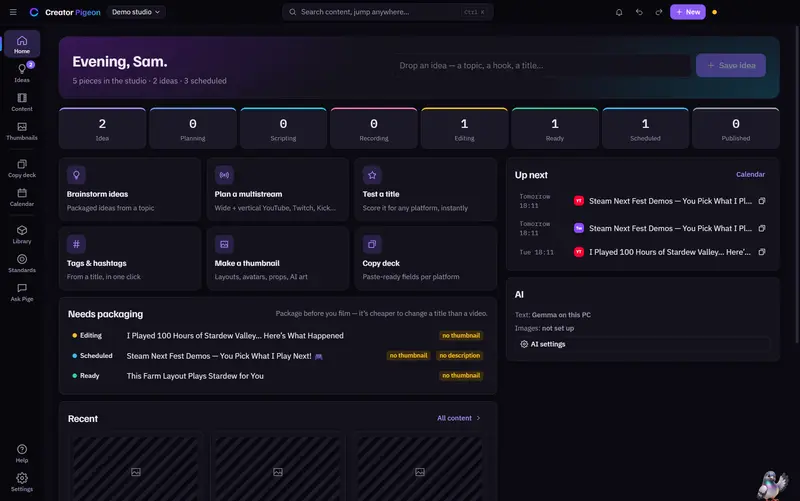
A content studio for creators that runs on your own PC. Titles, thumbnails, descriptions, tags and hashtags for YouTube, Twitch, Kick, TikTok, Instagram, X and more — written once, fitted to each platform, and ready to paste when you go live.
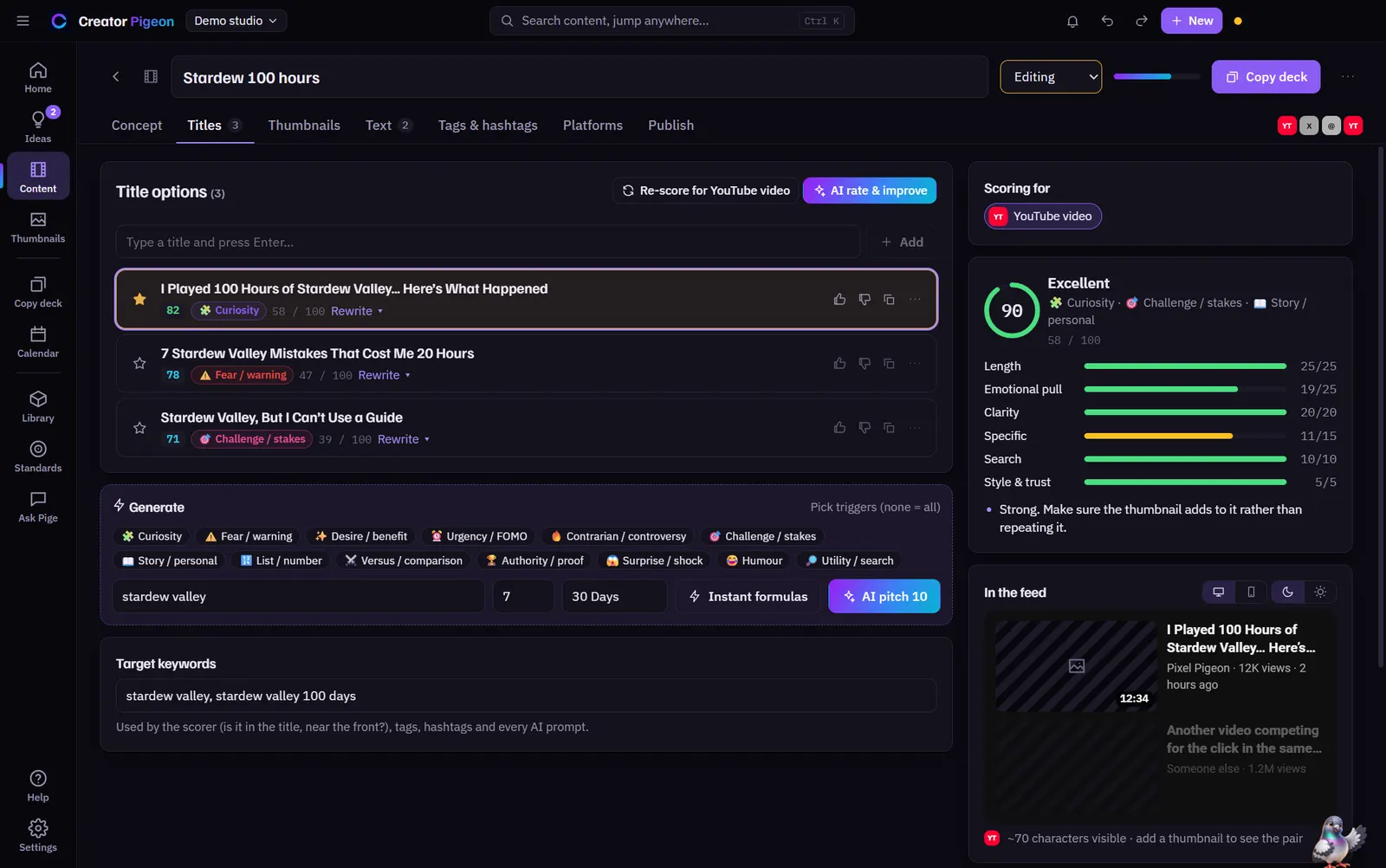
Creator Pigeon's Titles tab for a demo video: three title options with scores and emotional triggers, a 90 out of 100 score breakdown for YouTube, and formula buttons for generating more.
The real app on its demo studio, "Pixel Pigeon": every title scored for the platform it's going to.
  • Title labA live 0–100 score for each platform, formula titles by trigger (curiosity, stakes, story…) and previews of how it looks in the feed.
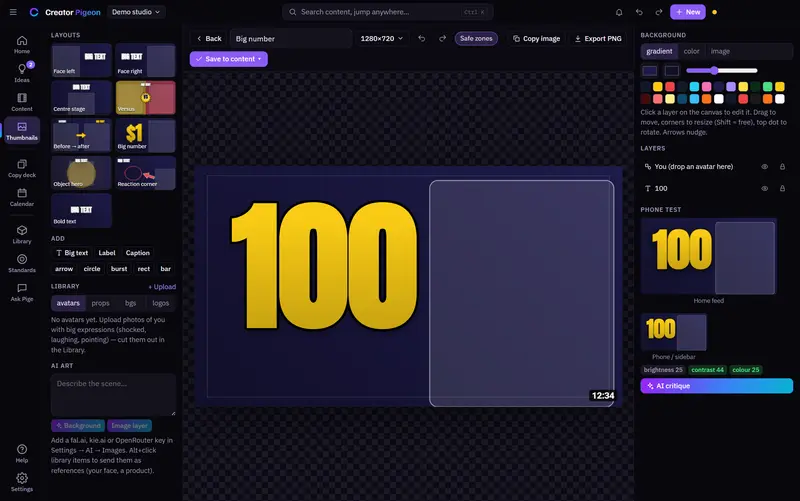
  • Thumbnail composerReady layouts or templates from your own designs, brand kits, crops, masks, curved text and stickers, with safe zones and a phone-size check before you export.
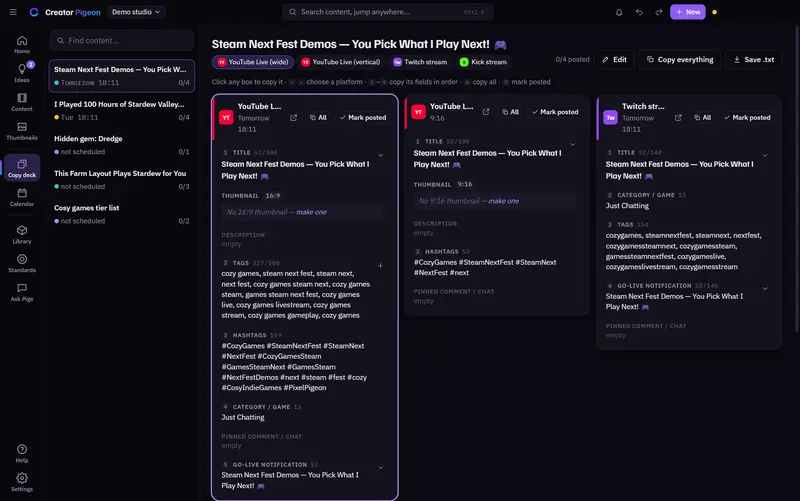
  • Copy deckEvery platform's fields in paste order, one click each — built for multistreaming wide and vertical YouTube, Twitch and Kick at once. Stream presets, snippets for every field and a quick-copy shelf with hotkeys; the deck can even open on your phone over Wi-Fi.
  • Calendar & post kitsDrag content onto the calendar for reminders. Post kits turn release notes into ready-to-post drafts for ten platforms.
  • AI on your PCGemma runs locally for writing help, and EmbeddingGemma powers smart search — or bring your own keys. Nothing needs an account.
Creator Pigeon's Home page for the demo studio: a pipeline from idea to published, quick tools, what needs packaging and what's up next.
Home: the pipeline, what still needs packaging, and what's up next.
Creator Pigeon's thumbnail composer with the Big number layout, a layer list and a phone-size preview.
The thumbnail composer, with a phone-size test as you go.
Creator Pigeon's Copy deck for a demo multistream: columns for YouTube Live wide, YouTube Live vertical and Twitch, each with title, tags, hashtags and go-live text ready to copy.
The copy deck for a multistream: click a box, paste, mark it posted.

In the lab Not available yet

Nest Stream Tools: a control room for live shows.

More from behind the scenes. Nest is a suite of stream tools that run on your own PC and speak to OBS, Streamer.bot and every chat at once — so one person can run a show that feels like it has a whole crew.
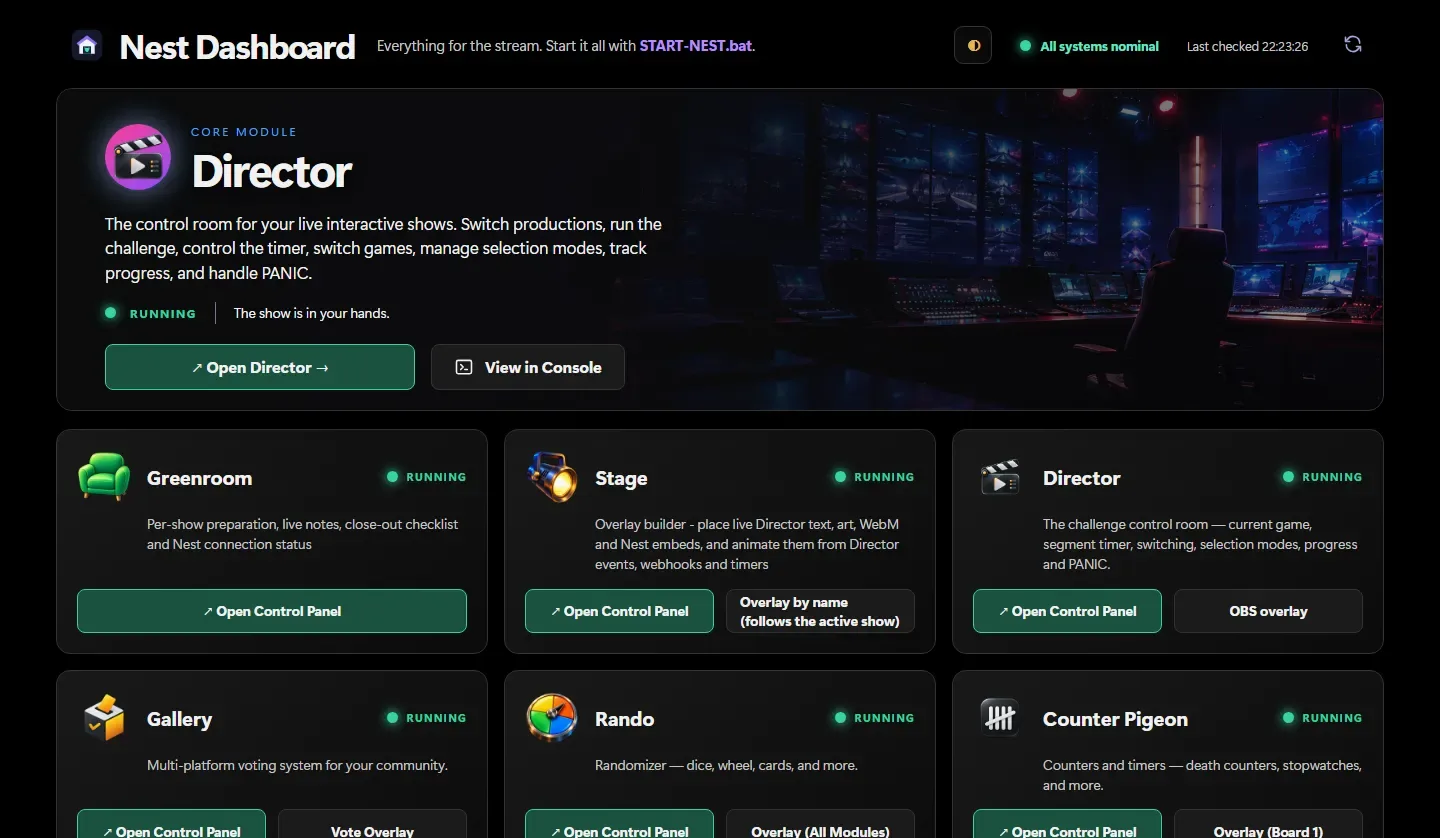
The Nest Dashboard: Director as the core module, with cards for Greenroom, Stage, Gallery, Rando and Counter Pigeon, each showing it's running.
The real Nest Dashboard, running locally: one home for every tool.
  • DirectorThe show's control room — segment timer, game switching, wheel or audience-vote picks, progress tracking and a big PANIC button.
  • StageAn overlay builder with live text and art, animated entrances and Sketch — draw over the game, live, or go full screen with just the drawing. The editor and Sketch show a smooth, live picture from OBS.
  • GreenroomPre-show checklists, on-air reminders and a wall of your live streams on every platform.
  • GalleryOne vote across Twitch, YouTube, TikTok and Kick chats, counted together. Viewers vote with !1 or !A, picked up through Social Stream Ninja.
  • Rando & Counter PigeonPrize wheels, physics 3D dice and marble races, with overlays that mirror the real wheel and leave with the exit animation you pick; death counters, timers and records.

Collektory × Nest: Now playing, live.

Link Collektory and the Nest knows what you're playing and on what — then Stage puts the cover, the real 3D box, the device and your achievements on stream, and Rando can spin a wheel straight from your collection. Everything stays on your PC, behind your own access key.
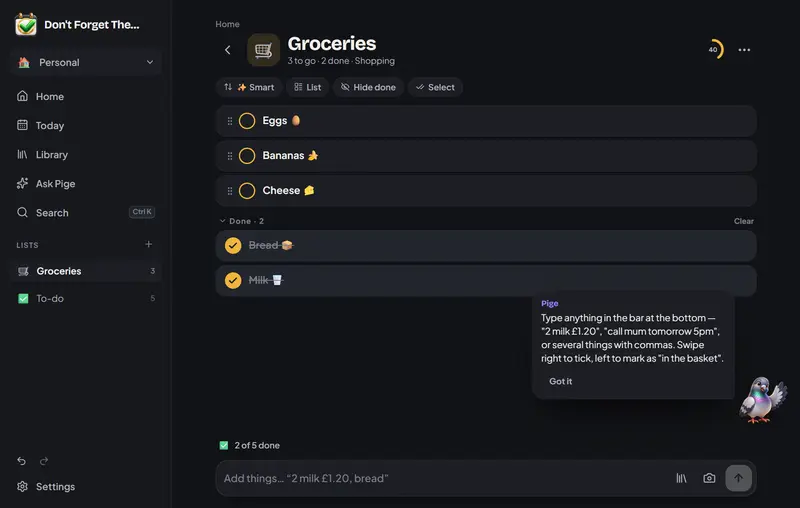
Illustration: how Collektory feeds a Now playing overlay through Nest Collektory sends what you're playing to Nest's Director and Stage, which draw a Now playing card with a 3D box in your OBS overlay. Collektory now playing · device Nest Director Stage Rando · Greenroom OBS overlay NOW PLAYING {game.title} via {device}
Illustration, not a screenshot.
Don't Forget The…: a Groceries list with three items to get and two ticked off, the quick-add bar at the bottom and a tip from Pige.

Also in the lab Getting good

Don't Forget The…

Shopping, tasks and events in one friendly list app. Type like you'd text a friend — "2 milk £1.20" or "call mum tomorrow 5pm" — and it works out the quantity, price and date. Repeats, reminders, a Today view and ready-made lists, with everything stored on your device. It runs on the desktop and as a web app you can install on your phone.

Now on version 1.3: pictures on things, emoji as you type, smart search, add from a photo (read on your device), group by aisle, a trash for anything you delete and an icons-only side bar, with clearer colours in every theme.

Screenshot: the real desktop app on a fresh test profile with its starter Groceries list.

None of these are out yet. Want to hear when they are? Join the newsletter — it hears first.

Walk the Way with us.

Join the newsletter for game dev updates, design tutorials and first dibs on everything we launch.